The following process has been tested and confirmed as working with Java Runtime Environment version 8 and SCCM R2.
It does the following tasks:
- Installs Sun Java silently
- Installs Internet Explorer extension
- Installs Firefox extension
- Disables automatic updates
| Having troubles with the instructions? Take a look at our example download. Full Download: JavaSilentInstall.zip |
- Download standalone (offline) installer for both 32-bit and 64-bit Windows for Java from www.java.com/en/download/manual.jsp
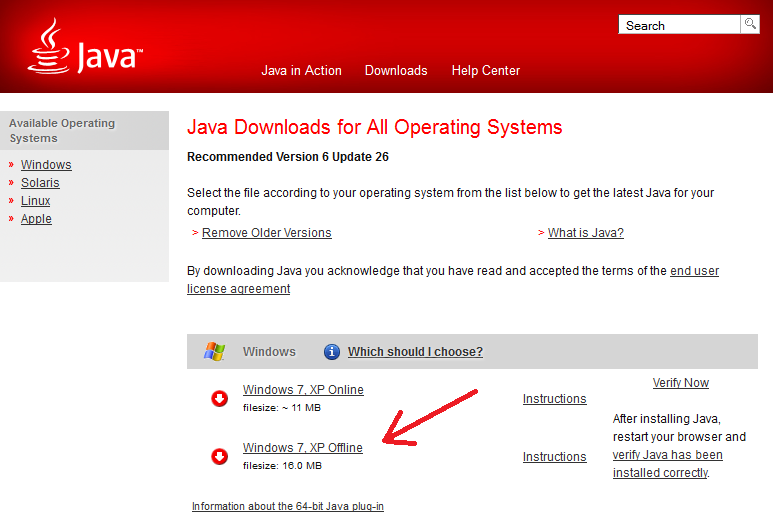
- Create a text file called install.cmd and copy in the following information
@echo off
cls
echo --------------------------------------------------------
echo .
echo .
echo .      Installing Java Runtime Environment - Please Wait.
echo .         (This window will close once installed)
echo .

REM Installing JRE 32-bit
"%~dp0jre-8u131-windows-i586.exe" INSTALL_SILENT=1 STATIC=0 AUTO_UPDATE=0 WEB_JAVA=1 WEB_ANALYTICS=0 EULA=0 REBOOT=0

REM If 64-bit Windows JRE 64-bit is also required
REM Installing JRE 64-bit
if exist "%ProgramFiles(x86)%\" "%~dp0jre-8u131-windows-x64.exe" INSTALL_SILENT=1 STATIC=0 AUTO_UPDATE=0 WEB_JAVA=1 WEB_ANALYTICS=0 EULA=0 REBOOT=0

REM Disable automatic updates
reg delete "HKEY_LOCAL_MACHINE\SOFTWARE\Microsoft\Windows\CurrentVersion\Run" /v SunJavaUpdateSched /f
reg add "HKEY_LOCAL_MACHINE\Software\JavaSoft\Java Update\Policy" /v EnableJavaUpdate /t REG_DWORD /d 0 /f
- Copy the installer files and install.cmd to your software package share
- You can now create your SCCM package or deploy the software by using install.cmd.
For more information on creating SCCM packages see SCCM – How to Distribute Software Packages.
taskkill /f /im firefox.exe
taskkill /f /im iexplore.exe
taskkill /f /im chrome.exe
I want to first close all running browser (i.e IE, Mozila).how to i close these browser first by command.
Yep. Haven’t figured it out yet, but it won’t allow the install to complete. Have you figured this out?
I tried to follow the same steps for Java 1.6.37 and 1.6.31 but failed. Actually, the entries for Mozilla is not working.
This package made by you is working fine.
Any suggestions, please.
You can update Java using WSUS as well, theres a step by step guide to do that here:
http://itguru82-sccm.blogspot.co.uk/2012/08/java-updates-using-wsussccm.html